¶ Applicable Scenario
- Use this guide when the air unit cannot connect to a computer.
¶ Troubleshooting
¶ Case 1: Insufficient Power Supply
- Avatar series air units must be connected to an external power source while connected to a computer. A USB connection alone cannot power the device sufficiently for normal operation.
¶ Symptoms
- The computer does not detect the storage device after the USB cable is connected.
¶ Solution
- Connect a battery or another suitable external power source and ensure that the power supply is stable.
¶ Case 2: Damaged Connector
¶ Symptoms
- After the USB cable is connected, the computer reports a device error or cannot access the device.
¶ Solution
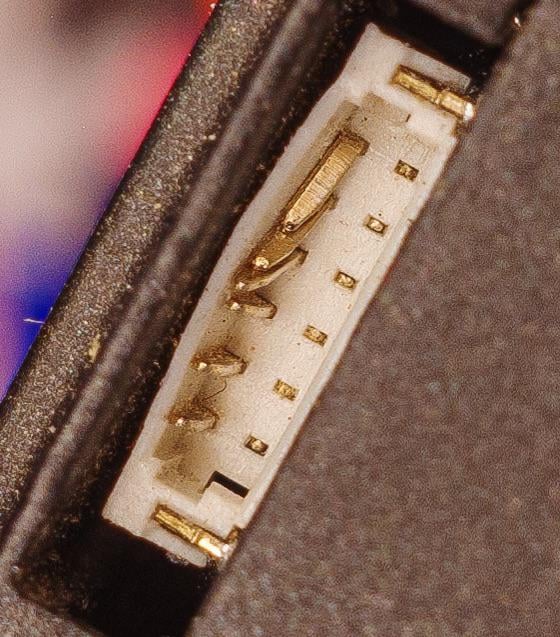
- Inspect the pins inside the USB port on the air unit for bending or damage.
- Try using another compatible firmware update adapter cable.
- If a pin is bent, carefully straighten it with tweezers.
¶ Case 3: Incorrect USB Cable
¶ Symptoms
- The air unit is receiving sufficient power, and neither the adapter cable nor the connector pins appear damaged, but the computer still cannot detect the storage device.
¶ Solution
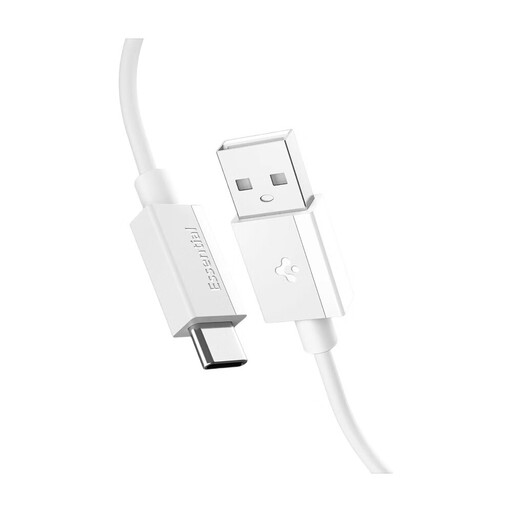
- Use a USB-A to USB-C data cable when connecting the air unit to a computer.
- Do not use a USB-C to USB-C cable, as the computer may be unable to detect the device.
- This issue is more commonly encountered on Mac computers. Connect a USB hub or adapter with a USB-A port to the Mac first, then connect the air unit using a USB-A to USB-C data cable.
¶ Important Notes
Always use a cooling fan when the air unit remains connected to a computer for an extended period during configuration or firmware updates. Prolonged operation without sufficient airflow may cause the air unit to overheat and enter thermal protection. Repeated exposure to high temperatures may permanently damage the product.
¶ Technical Support
If the issue persists, contact an official support channel for further technical assistance.