¶ Radio Regulations
Radio regulations vary by country and region. You are responsible for checking and complying with all applicable local laws and regulations.
¶ What You Need
- A computer
- A microSD card
- A card reader
¶ Changing the Regional Radio Standard
¶ Step 1: Format the microSD Card
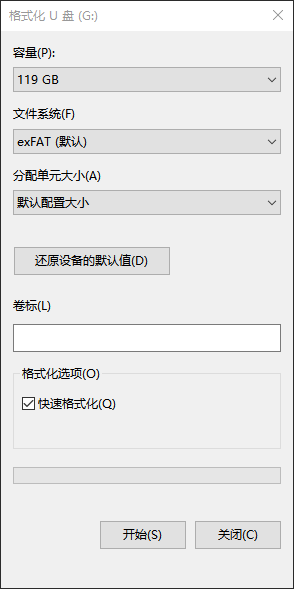
- Insert the microSD card into the computer and format it as exFAT.
¶ Step 2: Create the Configuration File
- Create a text file named:
avatar_std
- Enter the following value in the file, then save it:
2
¶ Step 3: Insert the microSD Card
- Insert the microSD card into the receiver unit.
- Power-cycle the device.
- The device will switch to the FCC radio standard.
¶ Unlocking the Maximum RF Output Power
Radio regulations vary by country and region. You are responsible for checking and complying with all applicable local laws and regulations.
¶ Step 1: Format the microSD Card
- Insert the microSD card into the computer and format it as exFAT.
¶ Step 2: Create the Configuration File
- Create a text file named:
avatar_pwr
- Enter the following value in the file, then save it:
1
¶ Step 3: Insert the microSD Card
- Insert the microSD card into the receiver unit.
- Power-cycle the device.
- The device will unlock the maximum RF output power supported by the hardware.
¶ Download
- If the procedure fails, the configuration file may have been created incorrectly, or the microSD card may not be compatible.
Download the prepared configuration files directly ←
¶ Switching to Other Regional Radio Standards
The number entered in the avatar_std file selects the regional radio standard:
- 0 — China SRRC
- 1 — European Union CE
- 2 — United States FCC
- 3 — Japan MIC
After performing Reset All, the device will return to the factory-default CE standard.
¶ Number of Channels by Radio Standard
- FCC: Eight channels — CH1, CH2, CH3, CH4, CH5, CH6, CH7, and P
- CE/SRRC: Four channels — CH1, CH2, CH3, and P
- MIC: Three channels — CH1, CH2, and P
- High Bitrate Mode is available only under the FCC standard. When enabled, the eight FCC channels are reduced to four: CH1, CH2, CH3, and CHP.
¶ Important Notes
Unlocking the maximum RF output power does not necessarily increase transmission range. In some environments, it may reduce performance due to increased interference or other RF conditions.