¶ When to Use This Guide
- When using this product for the first time or after replacing the flight controller.
¶ Preparation
- A computer
- A flight controller
- USB cable, etc.
¶ Betaflight
¶ Step 1: Update the Flight Controller Firmware
- Update the Betaflight flight controller firmware to V4.5 or later.
¶ Step 2: Update the HD FPV System Firmware
- Update the Avatar HD system firmware to V38.44.13 or later, and make sure the receiver unit and air unit are running the same firmware version.
¶ Step 3: Connect the Cables
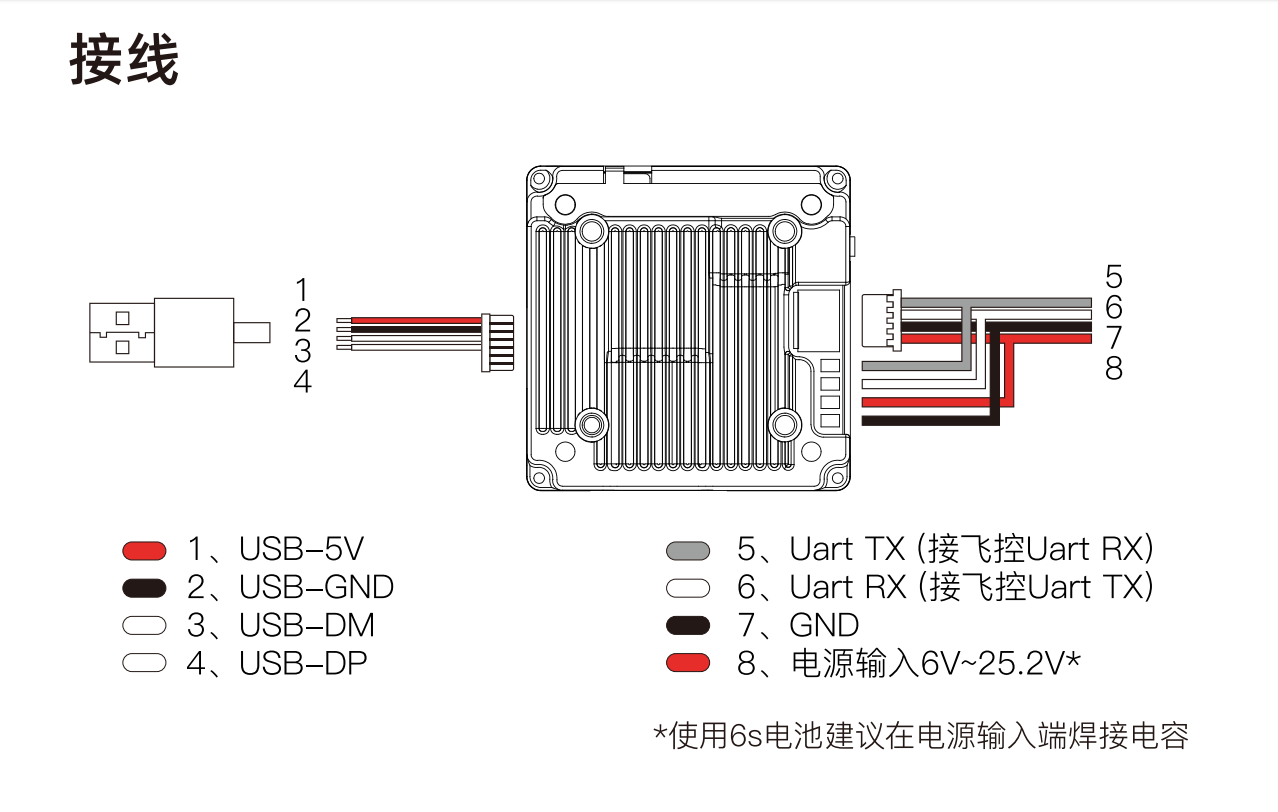
- UART wiring must follow the rule TX to RX and RX to TX. Do not connect TX to TX or RX to RX.
- The V2 air unit is used as an example below. Other air units are connected in a similar way; refer to the corresponding product manual for details.
¶ Step 4: Use a Preset for Quick Setup
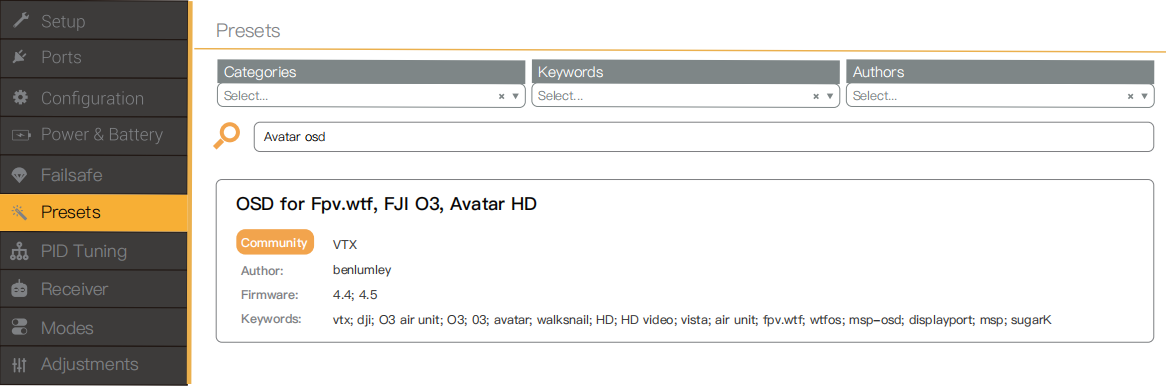
- Using a preset allows you to quickly complete the port configuration without entering complicated CLI commands.
- In Betaflight Configurator > Presets, search for Avatar OSD or HD OSD.
¶ Step 5: Select the UART Port
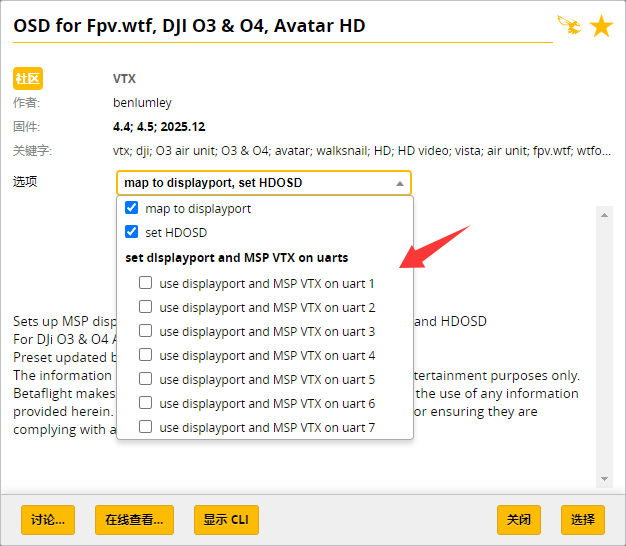
- Open the preset and select the UART port actually connected to the flight controller. For example, if the air unit is connected to TX2 and RX2, select UART2. Follow the same rule for other UART ports.
¶ Step 6: Save the Settings
- Click Save and Reboot in the lower-right corner of Betaflight Configurator.
¶ INAV
¶ Step 1: Update the Flight Controller Firmware
- Update the INAV flight controller firmware to V9.01 or later.
¶ Step 2: Update the HD FPV System Firmware
- Update the Avatar HD system firmware to V38.44.13 or later, and make sure the receiver unit and air unit are running the same firmware version.
¶ Step 3: Select the Correct Port
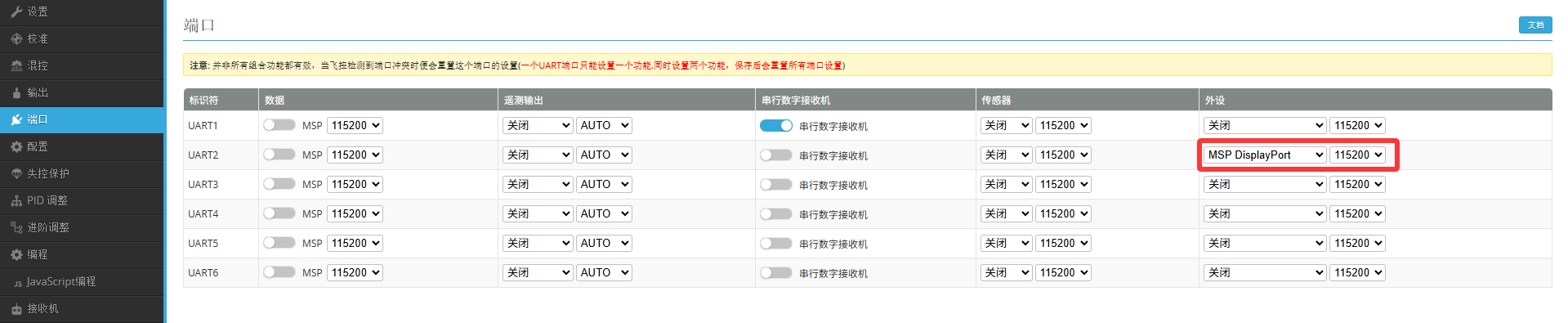
- Connect the flight controller to INAV Configurator and select the UART port actually connected to the air unit.
¶ Step 4: Save the Settings
- Click Save and Reboot in the lower-right corner of INAV Configurator.
¶ ArduPilot
Wiring and power supply are not repeated here. Refer to the Betaflight section above for details.
In this guide, theninSERIALnrepresents the UART port connected to the air unit. For example, if the air unit is connected to TX2 and RX2, useSERIAL2.
| OSD_TYPE | 5 | MSP_DISPLAYPORT |
| SERIALn_PROTOCOL | 42 | DisplayPort |
| SERIALn_BAUD | 115 | 115200 |
| SERIALn_OPTIONS | 0 | None |
¶ Video Tutorial
Thanks to “Painless360” for providing this tutorial video.
¶ Other Information
- Betaflight 4.3 uses a completely different configuration method from current versions. Unless there is a specific reason to use it, there is generally no need to use the older Betaflight version.
Click here to expand/collapse
Copy and enter the following CLI commands:
set osd_displayport_device = MSP
set displayport_msp_serial = 0
save
0 is not a fixed value. For example, 0 corresponds to UART1, 1 corresponds to UART2, and so on.