¶ When to Use This Guide
- Use this guide if a signal warning appears after flying only a short distance and long-range operation is not possible.
¶ Troubleshooting Steps
¶ Case 1: Insufficient Power Supply
- For example, the Avatar HD GT air unit requires at least 12 V, 2 A for normal operation.
- Make sure both the receiver unit and air unit are receiving a stable and sufficient power supply.
¶ Case 2: Standby Mode
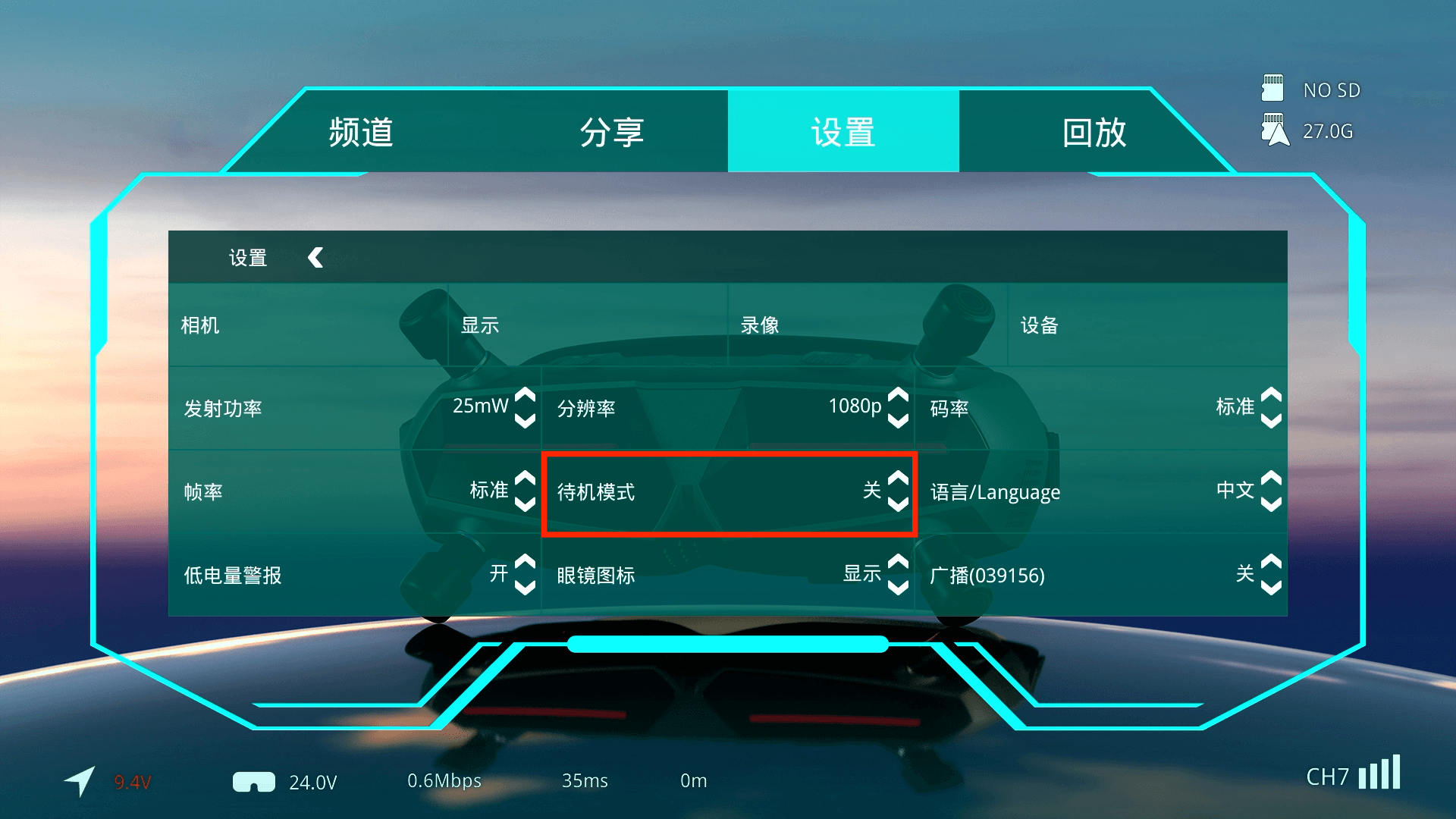
- Standby Mode, also referred to as PIT Mode, is designed to reduce RF output power and help delay thermal protection shutdown.
- In Standby Mode, the air unit operates at the minimum RF output power of 25 mW, regardless of the configured transmit power.
¶ With a Flight Controller
- If a flight controller is installed, make sure the flight controller OSD is working correctly. After the motors are armed, the air unit should automatically exit Standby Mode.
- If the flight controller OSD is working correctly but the air unit still does not exit Standby Mode after arming, try a different UART port or another flight controller model.
¶ Without a Flight Controller
- If the system does not use a flight controller and only has an air unit, such as on an RC car, Standby Mode must be disabled manually from the receiver unit.
Always provide adequate airflow with a fan when operating the air unit on the ground to prevent overheating and possible damage.
¶ Case 3: Antenna Fault
- Antennas are wear items. Check whether the antennas are damaged or loose, and try replacing them to determine whether the issue is antenna-related.
- If an antenna makes a noticeable rattling sound when shaken, replace it immediately. A damaged antenna may cause poor signal performance and, in severe cases, may damage the air unit RF module.
¶ Case 4: Incorrect Antenna Orientation
- This issue is particularly common when using the Avatar Goggles L. The Goggles L has two built-in patch antennas with strong directional characteristics and a limited effective reception angle.
- Many users naturally tilt their head downward during operation, which may cause the antennas to point away from the aircraft and significantly reduce signal strength.
¶ Case 5: Environmental Interference
Environmental interference can generally be divided into RF interference and obstruction-related interference.
¶ RF Interference
- RF interference occurs when other wireless devices near the operating area interfere with the FPV video system. If this occurs, try enabling Frequency Hopping, which requires firmware V39.44.18 or later.
- When Frequency Hopping is enabled, the system scans the surrounding RF environment and automatically switches to a more suitable channel in real time. FCC mode is recommended to provide access to more available channels.
- Changing to a less congested operating environment is recommended.
¶ Obstruction-Related Interference
-
Environments containing large amounts of metal or reinforced concrete can cause severe RF attenuation, reflection, shielding, and multipath fading.
-
It is recommended to change to a different flying environment.
¶ Important Notes
Even though Standby Mode reduces RF output power, the air unit can still enter thermal protection.
Unlike analog VTXs, most of the heat generated by an HD digital FPV air unit comes from the SoC, which continuously processes HD video even while the air unit is in Standby Mode.
Use a fan to cool the air unit during ground testing and configuration.
¶ Technical Support
If the issue persists after completing the troubleshooting steps above, please contact CADDXFPV official support for further assistance.