¶ Overview
- The gimbal Axis Lock function allows you to clearly observe the aircraft’s attitude without removing your goggles.
¶ Video Tutorial
¶ Step-by-Step Guide
¶ How to Enable Axis Lock Using the Shortcut?
All of the following requirements must be met for the Axis Lock shortcut to work:
- The Avatar HD System firmware must be V39.44.15 or later.
- The GM V1 Series gimbal firmware must be V3.6 or later, and the gimbal must be set to M0 mode in the PC configuration software.
- The head tracking firmware on the goggles must be V2.3 or later.
- The shortcut function must be enabled in the Head Tracking menu on the goggles.
¶ How to Use
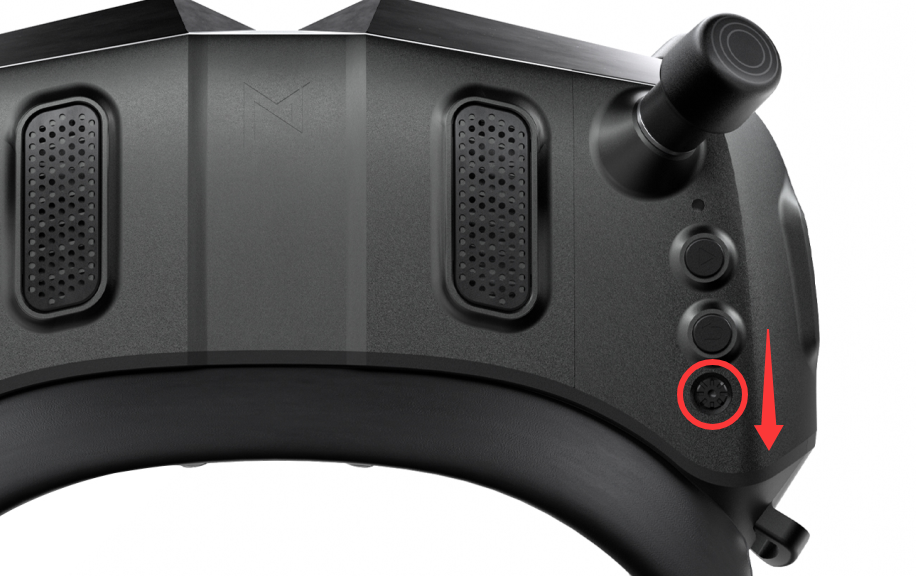
- With the menu closed, double-press the Down button on the five-way button to enable or disable Axis Lock. Once the gimbal is locked, stabilization will be disabled. This function is useful when the aircraft is taking off or landing.
¶ Alternative Method
- Use the gimbal control function in INAV 8.0.
¶ Requirements
- The INAV firmware must be V8.0 or later.
- The GM V1 Series gimbal firmware must be V3.6 or later.
¶ Wiring
- Connect the gimbal UART port to an available UART port on the flight controller.
- Connect another available UART port to the gimbal.
¶ How to Use
Coming soon.