¶ Applicable Scenario
- The GM V2 gimbal continuously vibrates after startup, or the image is not properly stabilized.
¶ No Camera Installed
-
The gimbal uses a PID algorithm to actively stabilize its movement. Without a camera installed, the weight distribution is unbalanced. The default PID algorithm attempts to correct the position but cannot do so successfully.
-
Installing a camera can resolve the gimbal vibration issue.
¶ Camera Installed
-
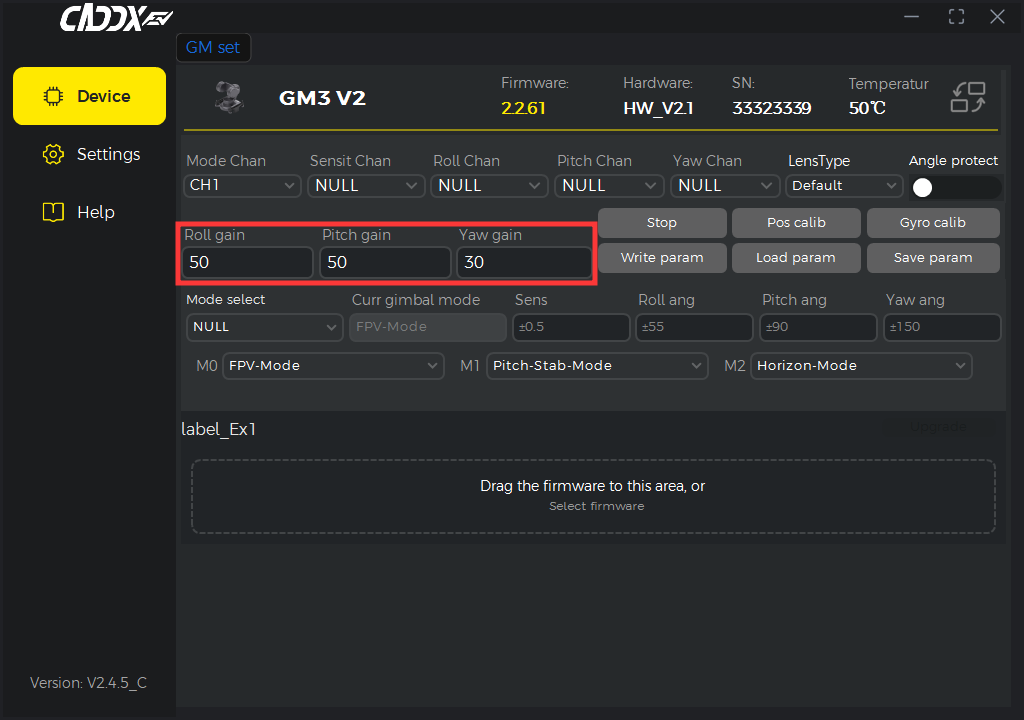
If the camera is installed but the gimbal continues to vibrate, the camera may not be compatible with the default PID settings. The default parameters need to be adjusted in PC Tool.
-
In most cases, reducing the parameter values can resolve the issue. If only one axis vibrates, adjust the parameters for that axis only.
-
For example, if the image displayed in the goggles shakes vertically, adjust the Pitch Gain only.
¶ Notes
After changing the parameters, remember to write the settings to the device; otherwise, the changes will be lost.